
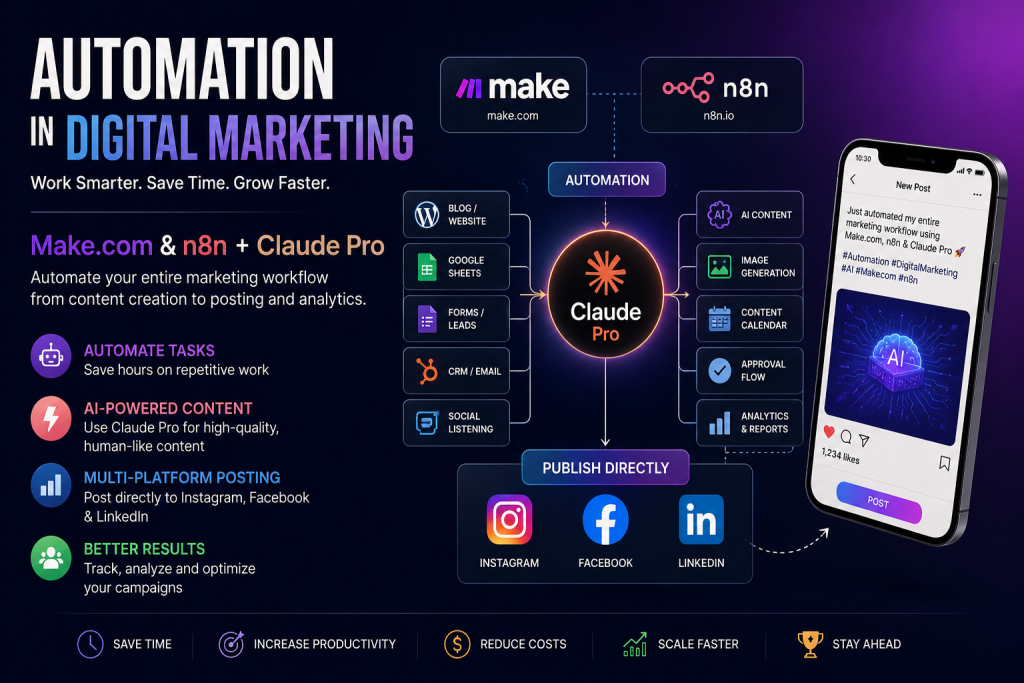
How Automation Is Transforming Digital Marketing: Make.com and n8n
Digital marketing involves dozens of repetitive tasks every day—creating content, publishing social media posts, collecting leads, sending emails, updating CRMs, tracking campaigns, generating reports, and responding to customers.
Doing all of this manually can consume hours every week.
This is where marketing automation comes in.
Tools such as Make.com and n8n allow marketers to connect different applications and create automated workflows. Instead of manually moving information from one platform to another, an automation can trigger an action automatically whenever something happens.
For example:
New blog published → AI creates social media captions → content is adapted for each platform → image is selected → post is published on Instagram, Facebook and LinkedIn → result is recorded in Google Sheets.
That’s a complete digital marketing workflow.
What Is Digital Marketing Automation?
Digital marketing automation means using software to automatically perform repetitive marketing activities based on predefined triggers, conditions and actions.
A simple automation can look like:
Trigger → Process → Action
For example:
New lead from Facebook → Add lead to CRM → Send welcome email → Notify sales team
Instead of someone manually performing each step, the workflow handles it automatically.
Automation doesn’t mean removing humans from marketing. Instead, it allows marketers to spend less time on repetitive operations and more time on strategy, creativity and decision-making.
What Is Make.com?
Make.com is a visual automation platform that allows you to connect applications and create workflows without traditional programming.
Make calls these workflows scenarios. A scenario consists of different modules that perform actions or move information between applications.
For example:
WordPress → OpenAI → Google Sheets → Instagram → Facebook → LinkedIn
You can visually build the entire process.
Make supports thousands of applications and provides integrations for platforms including Facebook, Instagram for Business, LinkedIn, Google Sheets, WordPress, Shopify, HubSpot and many others.
What Is n8n?
n8n is another workflow automation platform that allows you to connect applications, APIs, databases and AI models.
It is particularly useful when you want more control over your workflows and are comfortable working with APIs, logic, data manipulation and technical configurations.
For example, you can create a workflow such as:
Google Sheets → OpenAI → Image Generator → Instagram → Facebook → LinkedIn → Database
n8n also has examples of AI-powered workflows that generate and distribute content across Instagram, Facebook, LinkedIn and other platforms.
Make.com vs n8n
| Feature | Make.com | n8n |
|---|---|---|
| Ease of use | Very beginner-friendly | More technical |
| Interface | Visual | Visual + technical |
| Coding requirement | Usually minimal | Optional, but useful |
| Complex workflows | Excellent | Excellent |
| API flexibility | Excellent | Excellent |
| AI automation | Yes | Yes |
| Social media automation | Yes | Yes |
| Best for beginners | ⭐⭐⭐⭐⭐ | ⭐⭐⭐ |
| Best for technical users | ⭐⭐⭐⭐ | ⭐⭐⭐⭐⭐ |
If you are starting digital marketing automation from scratch, Make.com is probably easier to learn first.
Once you understand triggers, actions, filters, routers, APIs and webhooks, moving to n8n becomes much easier.
What Can You Automate in Digital Marketing?
There are many possibilities.
1. Social Media Content Automation
One of the most useful applications is automatically distributing content across multiple social media platforms.
Suppose you publish a new blog:
New WordPress Blog
↓
AI reads the article
↓
AI creates Instagram caption
↓
AI creates Facebook post
↓
AI creates LinkedIn post
↓
Image/video is selected
↓
Content is published
↓
Post details are stored in Google Sheets
This means one piece of content can automatically become multiple pieces of social media content.
Make supports Instagram for Business actions such as creating photo, carousel and Reel posts, as well as Facebook and LinkedIn integrations.
Can I Post Directly to Instagram, Facebook and LinkedIn?
Yes, this is possible, but the exact capabilities depend on the account type, platform permissions and the API actions available for the particular platform.
A typical workflow could be:
Step 1 — Create your content
You add:
- Topic
- Caption
- Image
- Date
- Time
- Status
into Google Sheets or Airtable.
For example:
| Topic | Caption | Image | Date | Status |
|---|---|---|---|---|
| AI Automation | 5 ways AI saves marketers time | image.jpg | Aug 20 | Approved |
Step 2 — Automation checks the sheet
Make or n8n detects:
Status = Approved
and
Date/Time = Now
Step 3 — AI adapts the content
Instead of posting exactly the same text everywhere, AI can create platform-specific versions.
More conversational + short caption + hashtags.
Slightly longer explanation + CTA.
Professional insight + business-oriented hook.
Step 4 — Publish
The workflow sends the content to the appropriate social platform.
Step 5 — Record the result
The workflow can update your spreadsheet:
Status → Published
and store:
- Publication date
- Platform
- Post URL
- Campaign
- Content type
This creates a basic automated content management system.
2. Blog-to-Social Media Automation
This is one of the best automations for an SEO-focused marketer.
Imagine you publish an article:
“10 Uses of AI in Digital Marketing”
Your automation can automatically:
- Detect the new WordPress article
- Extract the article
- Send it to an AI model
- Generate an Instagram caption
- Generate a Facebook post
- Generate a LinkedIn post
- Generate hashtags
- Create/select an image
- Publish the content
- Save the campaign information
So instead of:
1 blog → 1 piece of content
you can create:
1 blog → Instagram + Facebook + LinkedIn + email + other content
3. AI Content Creation Automation
You can connect Make or n8n with AI tools.
For example:
Google Sheets
↓
OpenAI / Claude / Gemini
↓
Generate content
↓
Human approval
↓
Publish
You can automate:
- Blog outlines
- Social media captions
- Headlines
- Meta descriptions
- SEO titles
- Product descriptions
- Email newsletters
- Ad copy
- YouTube descriptions
- Social media hooks
- Hashtags
- Content ideas
A particularly useful approach is human approval before publishing.
Instead of allowing AI to immediately publish everything:
AI creates → You review → Approve → Automation publishes
This gives you automation without losing editorial control.
4. Lead Generation Automation
Imagine someone fills out your website form.
Normally:
Form → You check email → Copy information → Add to CRM → Contact person
Automation can turn this into:
Form submission
↓
Create CRM contact
↓
Add to Google Sheets
↓
Send welcome email
↓
Notify salesperson
↓
Create follow-up task
For Facebook Lead Ads, Make can connect incoming leads to other systems such as Google Sheets and CRM platforms.
This can dramatically reduce the time between acquiring a lead and contacting them.
5. Email Marketing Automation
You can automate email marketing based on customer behaviour.
For example:
New subscriber
→ Welcome email
↓
Opens email
→ Send educational email
↓
Clicks product link
→ Add to interested-lead segment
↓
Doesn’t purchase
→ Send follow-up
↓
Purchases
→ Send thank-you email
You can connect tools such as Gmail, email marketing platforms, CRM systems and spreadsheets through automation platforms.
6. CRM Automation
A CRM contains valuable customer information, but manually updating it is repetitive.
Automation can automatically:
- Create new contacts
- Update customer information
- Assign leads
- Change lead status
- Create follow-up tasks
- Notify sales teams
- Segment customers
- Record campaign sources
For example:
Website Lead → CRM → Lead Score → Sales Team
You can even use AI to categorize leads.
Example:
Lead message:
“I need SEO services for my e-commerce website.”
AI can classify it as:
Service: SEO
Intent: High
Industry: E-commerce
Priority: High
The information can then automatically enter your CRM.
7. SEO Automation
SEO contains many repetitive processes that can be partially automated.
You can create workflows for:
- Keyword collection
- Keyword clustering
- Content briefs
- Meta title generation
- Meta description generation
- Internal-link suggestions
- Content repurposing
- Search-ranking monitoring
- SEO reporting
- Content calendars
For example:
Keyword list
↓
AI groups keywords by search intent
↓
Creates content clusters
↓
Creates article briefs
↓
Adds them to Notion/Trello
This doesn’t replace SEO strategy, but it can eliminate a lot of manual work.
8. Content Repurposing Automation
This is one of my favourite digital marketing automations.
Suppose you create a YouTube video.
Automation can turn it into:
YouTube Video
↓
AI transcript
↓
Blog article
↓
LinkedIn post
↓
Instagram caption
↓
Facebook post
↓
Short-video ideas
↓
Email newsletter
One piece of content becomes an entire content ecosystem.
This is especially useful for creators, agencies and personal brands.
9. E-commerce Marketing Automation
If you have an online store, automation can connect Shopify/WooCommerce with your marketing systems.
For example:
New product added
↓
AI creates product description
↓
AI creates social caption
↓
Generate marketing image
↓
Add product to content calendar
↓
Publish social media post
↓
Send email campaign
This can also be used for:
- Abandoned carts
- Customer emails
- Order notifications
- Product launches
- Review requests
- Customer segmentation
- Cross-selling
- Upselling
10. Social Media Monitoring
Automation isn’t only about publishing.
You can also monitor social media.
For example:
New comment
↓
AI analyses sentiment
↓
If positive → record engagement
If question → generate suggested reply
If complaint → notify human
This is much safer than automatically replying to every comment because sensitive or negative situations can be routed to a human.
11. Automated Marketing Reports
This is another area where automation can save hours.
Instead of manually collecting data from:
- Google Analytics
- Google Ads
- Meta Ads
- Search Console
- CRM
- Social media
you can create a workflow that collects data and puts it into a spreadsheet or reporting dashboard.
For example:
Every Monday 9 AM
↓
Collect marketing data
↓
Calculate KPIs
↓
Generate summary
↓
Create report
↓
Email report to client
You can even use AI to explain the numbers:
“Website traffic increased by 18% this week, while conversion rate declined by 4%. The biggest increase came from organic search.”
This makes automated reporting much more useful than simply dumping numbers into a spreadsheet.
12. Automated Content Calendar
You can create a central content database using:
Google Sheets / Airtable / Notion
with columns such as:
- Topic
- Platform
- Caption
- Creative
- Content type
- Date
- Time
- Status
- Approval
- Published URL
Then Make or n8n can monitor the database.
For example:
Status = Approved
↓
Date = Today
↓
Publish
This gives you a simple automated social media management system.
The Ultimate Digital Marketing Automation
If you want to build something impressive for your portfolio, create this:
AI-Powered Multi-Platform Content Machine
Step 1 — Content idea
You enter:
“How AI is changing digital marketing”
↓
Step 2 — AI research
AI researches the topic and creates key points.
↓
Step 3 — Content generation
AI creates:
- Blog article
- Instagram caption
- Facebook post
- LinkedIn post
- Email newsletter
- Short-video script
↓
Step 4 — Visual creation
Generate/select a suitable image or creative.
↓
Step 5 — Human approval
You review everything.
↓
Step 6 — Publishing
Approved content is automatically distributed to:
Instagram + Facebook + LinkedIn
↓
Step 7 — Tracking
The system records:
- Date
- Platform
- Content
- URL
- Campaign
↓
Step 8 — Analytics
After publication, engagement data is collected.
↓
Step 9 — AI analysis
AI summarizes:
- Best-performing platform
- Best-performing content
- Engagement rate
- Clicks
- Leads
↓
Step 10 — Optimization
The system suggests:
“LinkedIn posts containing practical AI examples are generating higher engagement. Create more content around real-world automation workflows.”
Now you’re no longer just scheduling posts.
You’re building an automated marketing system.
Make.com or n8n: Which Should You Learn?
If your goal is digital marketing + freelancing + agency work, I would recommend:
Start with Make.com
Learn:
- Triggers
- Actions
- Filters
- Routers
- Webhooks
- Data mapping
- APIs
- HTTP requests
- Error handling
- AI integrations
Then learn:
n8n
Once you understand automation concepts, n8n will make much more sense.
n8n is particularly interesting if you want to build more customized, API-heavy or technical workflows. Its ecosystem includes numerous examples for AI content creation and multi-platform publishing.
The Most Valuable Automations to Learn as a Digital Marketer
If you’re building your digital marketing skillset, prioritize these:
Beginner
1. Blog → Social Media
2. Google Forms → Google Sheets → Email
3. Lead Form → CRM
4. Content Calendar → Social Media
5. AI → Social Media Caption
Intermediate
6. AI Content Generation → Human Approval → Publishing
7. Facebook Lead Ads → CRM → Email
8. YouTube → Transcript → Blog → Social Media
9. Website → SEO Content → Social Media
10. Marketing Data → Automated Report
Advanced
11. AI-powered content factory
12. Lead scoring with AI
13. Automated customer segmentation
14. Multi-platform content distribution
15. AI marketing analytics and recommendations
Final Thoughts
The real value of automation in digital marketing isn’t simply “posting automatically.”
The bigger opportunity is connecting your entire marketing ecosystem.
Instead of having separate tools for content, leads, email, social media, CRM and analytics, automation platforms such as Make.com and n8n can connect these systems and allow information to flow between them.
The future digital marketer therefore doesn’t just need to know how to create content.
They need to understand:
Content + AI + Automation + Data + Analytics + Strategy
And if you learn how to build workflows such as:
Idea → AI → Content → Approval → Instagram/Facebook/LinkedIn → Analytics → Optimization
you can turn automation into a valuable digital marketing skill—and potentially offer marketing automation services to businesses and agencies.